Bibasi: a live interpreter for iPhone that speaks both sides of the conversation
Coming soon to the App Store
Bibasi is an iPhone app from Metly Media that interprets a conversation between people who do not share a language. You put the phone between you and talk: it works out who is speaking, translates each turn and says it aloud in the other language, in any of 59 languages. It also reads menus, signs and labels through the camera and converts prices into your currency. Bibasi is coming soon to the App Store as a subscription. It needs iOS 17 or later and an internet connection, and your conversation history stays on your phone.
What is Bibasi?
Bibasi is a live interpreter that runs on an iPhone. Two people who do not share a language put the phone between them and talk. Bibasi listens, works out who said what, and speaks each turn aloud in the other person's language, with both versions on the screen. It handles 59 languages, and it does two more jobs a trip keeps asking for: reading writing you cannot read, through the camera, and turning prices into your own currency.
Before anything else, the disclosure: Bibasi is our product. Metly Media builds it, so this page is the maker's guide, not an independent review. It is not on sale yet. Everything here describes the app as it is built today, and we will update the page when that changes.
Built for short conversations with strangers
Most of the language trouble on a trip happens in exchanges that last a minute: a price at a market stall, a question at a hotel desk, a driver asking which entrance you meant. They are quick, they turn on numbers, and nobody has time to type. Bibasi is built around those minutes. Our position is that an interpreter should get out of the way: one tap to start, then nobody touches the phone until the conversation is over.
The details follow from that. Prices said aloud are converted into your currency on the screen. The translator is told to keep numbers, prices and names exactly as they were said. And every translation is spoken, not just shown, so the other person hears it in their own language instead of leaning over your screen. It is made for people traveling for work, for family or for pilgrimage, and for anyone who has just moved somewhere new.
How a conversation works
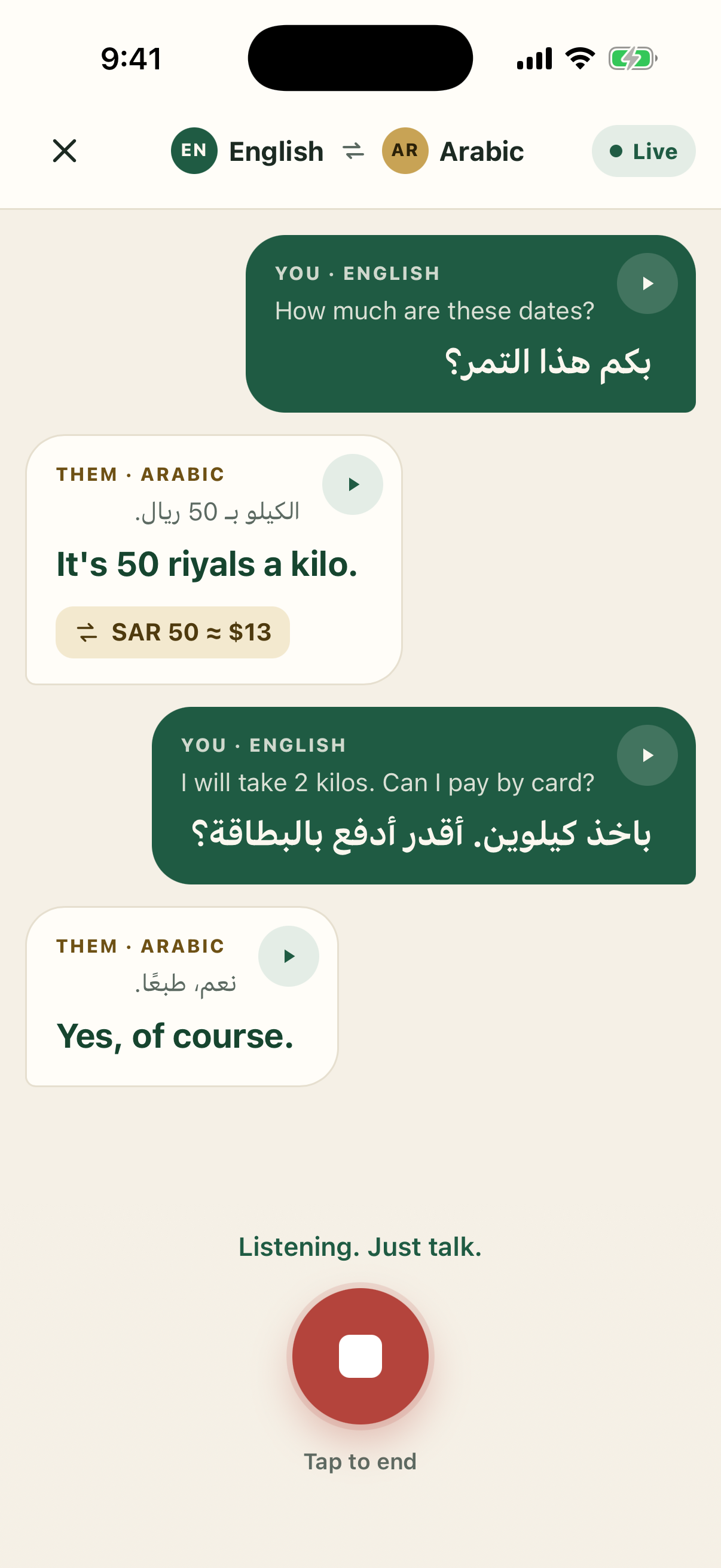
Choose your language and theirs; the languages you use most stay one tap away. Tap Start talking, put the phone between you, and talk normally. A short sound and a light vibration tell you Bibasi is listening, and you get the same again when you stop it.
There is no button to press for each sentence. Bibasi tells who is speaking from the language they speak, so the conversation goes back and forth at its own pace. Each turn shows up in both languages, and the translation is read out in a friendly voice at a medium pace. When someone names a price, the conversion appears right under it: "50 riyals a kilo" comes with SAR 50 ≈ $13.
It is not limited to two people. Three or four can share the phone, as long as the conversation is in two languages.
Read menus, signs and labels
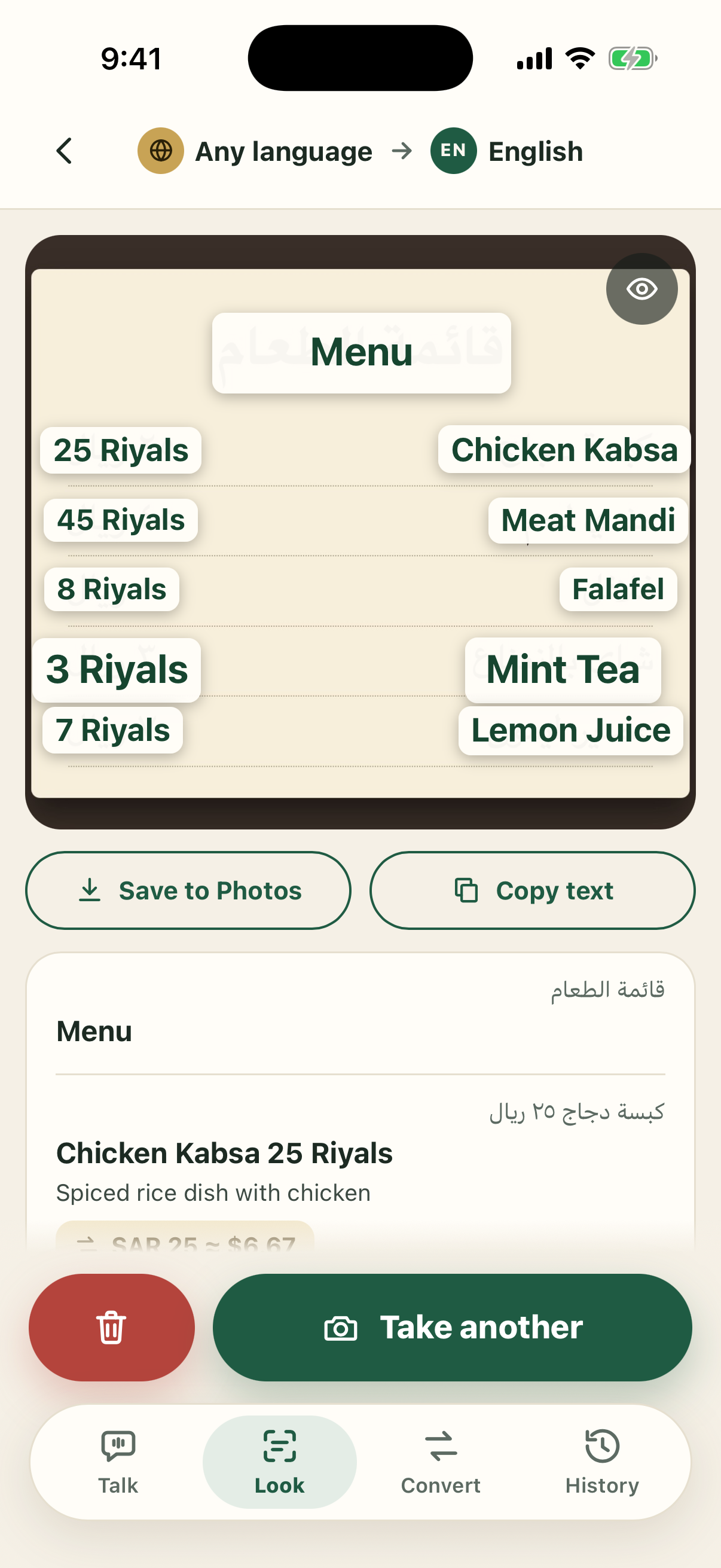
In the Look tab, open the camera and fit the writing inside the box, dragging its corners to frame one sign or a whole menu. Nothing is sent until you tap the shutter. Bibasi then reads what is inside the box, in any of its 59 languages, and lays the translation over the picture part by part: a heading, a full sentence, each dish with its price beside it.
Names are treated as names. A shop or a street is sounded out in your alphabet instead of being turned into a dictionary word, and a dish gets a short note on what it is. That note is a guess from the name, so never rely on it for allergies or ingredients. You can save the picture to Photos with the translation drawn on it, copy the text, or take another.
Convert prices
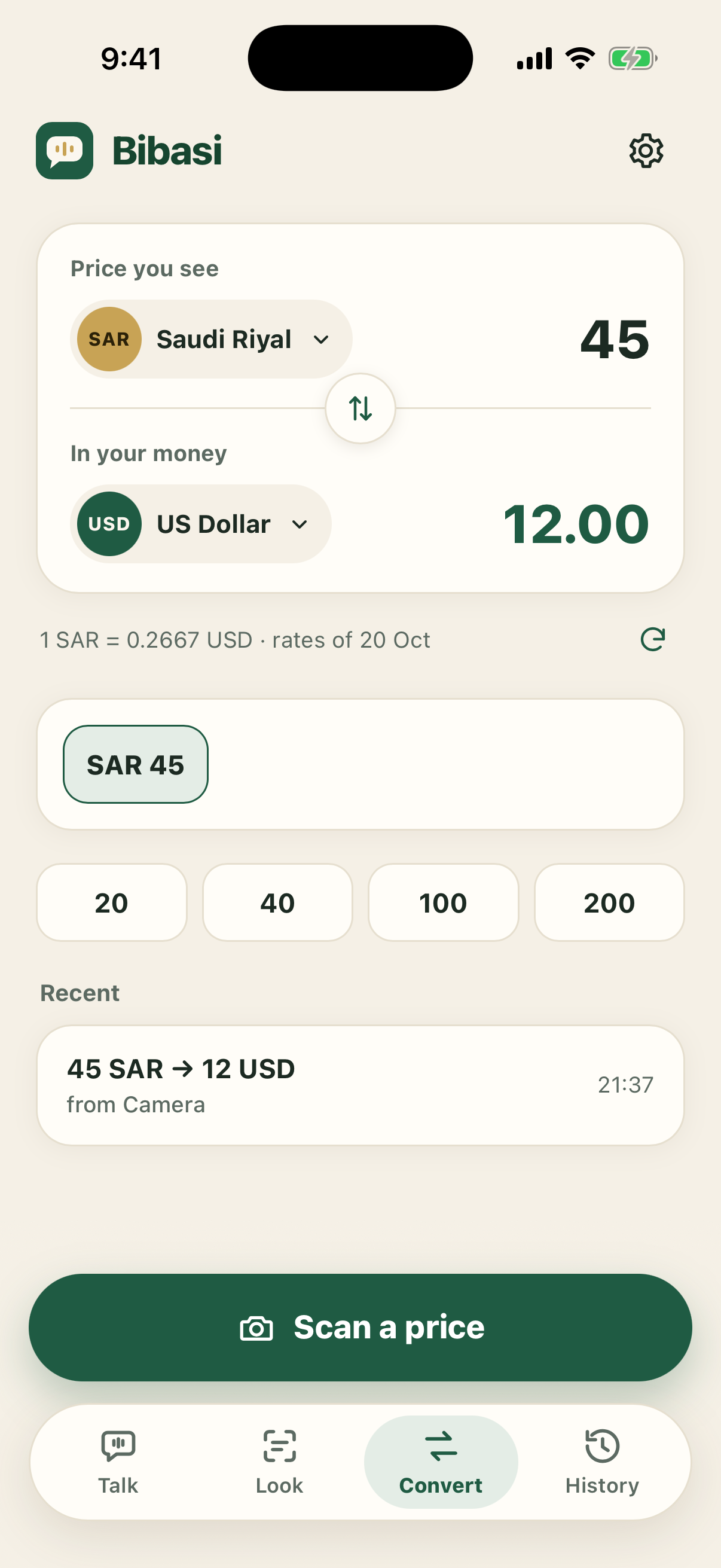
Type the price you see, or tap Scan a price and point the camera at a price tag or a menu. Every price it finds becomes a button named after its item, so you can check them one by one. The currency is picked for you: the one you typed, if you typed one, otherwise the one for your phone's time zone, otherwise the one that goes with the language you are speaking to.
The rates are daily reference rates. They tell you what something costs, not the rate a bank or an exchange office will give you.
History stays on your phone
Every conversation, every picture with what was read in it, and every price you converted is kept in History, on your phone only (and in your phone's own backup, if you use one). Tap the play button on any line to hear it again, which helps when a driver needs to hear the address one more time. Delete one item or all of them whenever you like.
Privacy: what is sent, and what is kept
An interpreter has to hear what both people say, so here is exactly what happens to it.
- While a conversation is running, the sound from the microphone goes from your phone to a third-party speech recognition service. The text then passes through our server to third-party AI models that translate it and speak it. Our server does not record or store any of it, and the microphone is used only while a conversation is running.
- The camera sends a picture only when you tap the shutter or scan a price, and only what is inside the box.
- We keep an anonymous ID, whether your subscription is active, and daily usage counts that hold no words or pictures. All of it is deleted 60 days after you last use the app, or sooner if you ask.
- No ads, no tracking, no selling of data. Before your first conversation or scan, Bibasi asks your permission to send speech, text and pictures to these services.
The full detail, including how long those services may keep what they receive, is in the Bibasi Privacy Policy. One thing we ask of everyone who uses it: tell the person you are talking to that an AI is translating.
The 59 languages
Any two of these can be paired for a conversation, and the camera reads all of them.
- Afrikaans
- Albanian
- Arabic
- Azerbaijani
- Basque
- Belarusian
- Bengali
- Bosnian
- Bulgarian
- Catalan
- Chinese
- Croatian
- Czech
- Danish
- Dutch
- English
- Estonian
- Finnish
- French
- Galician
- German
- Greek
- Gujarati
- Hindi
- Hungarian
- Indonesian
- Italian
- Japanese
- Kannada
- Kazakh
- Korean
- Latvian
- Lithuanian
- Macedonian
- Malay
- Malayalam
- Marathi
- Norwegian
- Persian
- Polish
- Portuguese
- Punjabi
- Romanian
- Russian
- Serbian
- Slovak
- Slovenian
- Spanish
- Swahili
- Swedish
- Tagalog
- Tamil
- Telugu
- Thai
- Turkish
- Ukrainian
- Urdu
- Vietnamese
- Welsh
Price and availability
Bibasi is coming soon to the App Store, for iPhone. It will be sold as an auto-renewing subscription through Apple. The price is not final yet; the app will show it before you pay, and you can cancel at any time from your iPhone's Settings.
Each subscription includes conversation time with daily and 30-day limits, and a daily allowance of camera pictures, so the service stays affordable for everyone. The current numbers are in the Terms of Use, and if you reach a limit, the app tells you when it opens up again.
Requirements, and what Bibasi is not
Bibasi needs an iPhone running iOS 17 or later and an internet connection, mobile data or Wi-Fi, because listening, translation and the voice all run online. It is an iPhone app, and there is no Android version.
It is not a human interpreter. Translations come from AI and can be wrong, incomplete or late, so confirm anything important, such as a price, an address, a time or a dose, in writing. Do not rely on it in an emergency, or for medical, legal or safety decisions.
One habit helps: let Bibasi finish speaking before you answer. It does not listen while it talks, which is what keeps it from translating its own voice, so words spoken over it can be missed.
Questions people ask about Bibasi
When will Bibasi be available?
Bibasi is coming soon to the App Store, for iPhone. There is no launch date yet, and this page will link to the App Store as soon as it is there.
How much will Bibasi cost?
Bibasi will be an auto-renewing subscription bought through Apple. The price is not final yet. The app shows it before you buy, and you can cancel at any time in your iPhone's Settings, under your name, then Subscriptions.
Does the other person need the app too?
No. Bibasi runs on one iPhone placed between you. The other person just talks: they hear the translation from your phone's speaker and can read it on the screen.
Which languages does Bibasi speak?
59, including English, Arabic, Bengali, Urdu, Hindi, Turkish, Persian, Malay, Indonesian, French, Spanish, Chinese and Japanese. Any two of them can be paired for a conversation, and the camera reads all of them.
Does Bibasi work offline?
No. Listening, translation and the voice all run over the internet, so Bibasi needs mobile data or Wi-Fi. Your history is stored on your phone and opens without a connection.
Can Bibasi translate a menu or a street sign?
Yes. In the Look tab, frame the writing inside the box and tap the shutter. Bibasi reads what is inside the box and lays the translation over the picture, part by part, with each price kept beside its dish and shop names sounded out rather than translated.
Does Bibasi record my conversations?
No. While a conversation runs, what both people say is sent to third-party AI services that turn it into text, translate it and speak it, and nothing is recorded or kept on our servers. Your history stays on your phone until you delete it. We keep only an anonymous ID, your subscription status and daily usage counts, all deleted 60 days after you last use the app.
Which iPhones does Bibasi work on?
Any iPhone running iOS 17 or later. Bibasi is an iPhone app, and there is no Android version.
Can more than two people use it?
Yes, as long as the conversation is in two languages. Three or four people can share one phone, and Bibasi translates whoever speaks into the other language.
More from Metly Media
- Lipo Voice AI: voice dictation for Mac in 50+ languages that translates as you speak
- ViewRank AI: find the best-performing Reels and TikToks on any public profile
- Guides and comparisons on growing on Instagram, TikTok, and YouTube