ViewRank AI: find the best-performing Reels and TikToks on any profile
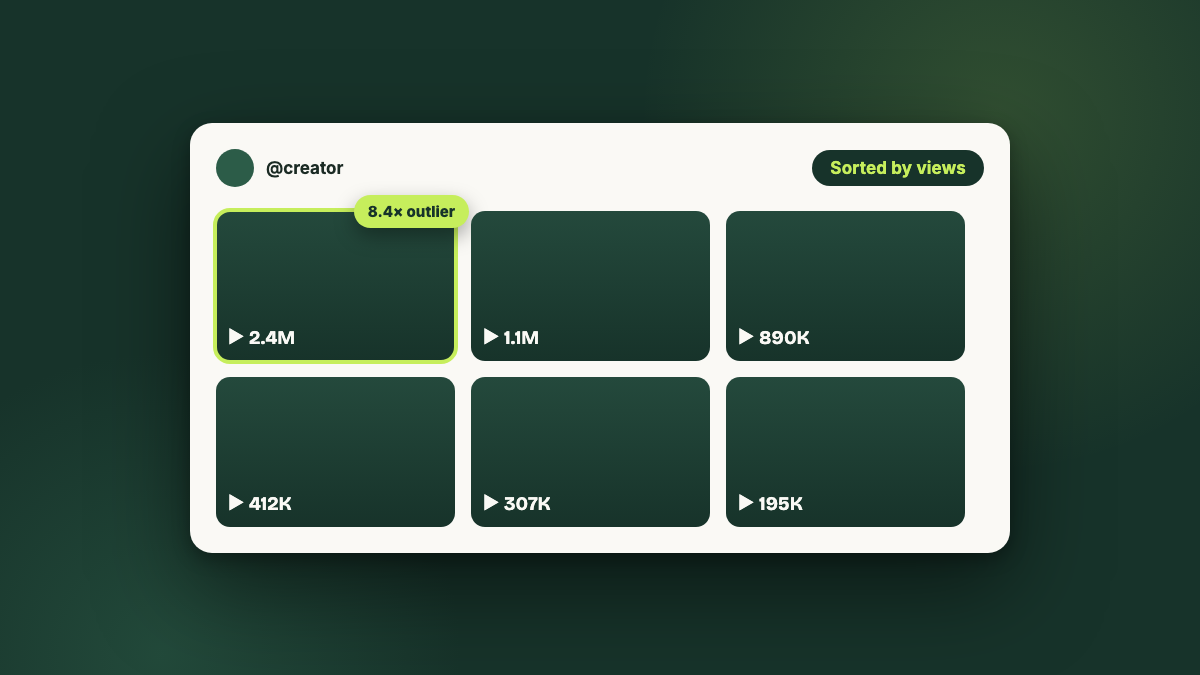
ViewRank is a free Chrome extension and paid AI platform from Metly Media that finds the best-performing videos on any public Instagram or TikTok profile. It sorts a profile by views, likes, comments, or newest, and scores every video against that creator's own average so genuine outliers stand out. The paid platform adds Viral Tracker alerts, scene-by-scene Visual Analysis, and AI-generated ideas and scripts, starting at $12.99 a month with a 7-day free trial.
The free extension holds a 5.0 rating on the Chrome Web Store, and more than 1,000 creators use it.
What is ViewRank?
ViewRank is two products that share one job. The free part is a Chrome extension that sorts any public Instagram or TikTok profile by views, likes, comments, or newest, and scores each video against that creator's own average. The paid part, ViewRank AI, is the platform on top: it watches the creators you tell it to, breaks successful videos down scene by scene, and writes ideas and scripts from what it finds.
One thing to be clear about before anything else: ViewRank is our product. Metly Media builds it, so this page is the maker's guide, not an independent review. What we can promise instead is accuracy. Every number here comes from the product and from viewrankai.com, and we update this page when they change.
The premise behind it is simple: raw view counts are noise until you compare them to what that account normally does. 80,000 views is a breakout for a creator who averages 20,000 and a quiet week for one who averages 300,000. Most people research content by scrolling and guessing. ViewRank replaces the guessing with that comparison.
The free extension: sorting and outlier scores
Install the extension, open any public profile in Chrome on desktop, and choose how many videos to pull. It ranks a creator's Reels, posts, TikToks, or slideshows by views, likes, comments, or newest, and on TikTok it adds shares and saves. There is no account to create and no password to hand over, because it only reads what is already visible on the page.
Outlier scores instead of raw views
Every video gets a score against that creator's own average, and a video that earned at least twice their normal views is flagged as an outlier. That definition matters because it works at every size: on an account where nothing hits a million views, the video that doubled its baseline still stands out, and that video is the one that tells you what the audience responded to.
Profile baselines
Alongside the ranking you see average views, median views, and engagement rate for the profile you are looking at. Those three numbers are the context that turns "is 80,000 good?" into a question with an answer.
Research tools built in
A built-in player, favorites, notes, and tags keep the research in one place while you work through a profile, and everything you sort can be exported, which is what agencies use for client reports.
The paid platform: what the AI layer adds
Viral Tracker
Tell ViewRank which creators matter in your niche and it rechecks them every few days. When one of their videos beats their normal performance by 2x or more, you hear about it while the format is still fresh, instead of finding it three weeks later by scrolling.
Visual Analysis
A scene-by-scene breakdown of any video: what was said, what was on screen, and why that part held attention, with the frames beside each step so you can follow along. It names the format in one line and ends with a list of things you can copy in your own work.
Workspace, ideas, and scripts
Saved videos from both platforms live in one workspace, where you can transcribe them and generate hooks, ideas, and full scripts written for your subject and your audience. This is also where YouTube Shorts come in: they can be imported manually, by URL or file upload.
How people actually use it
The research loop looks like this, and the first two steps cost nothing:
- Install the free extension. Add ViewRank to Chrome, then open Instagram or TikTok on desktop.
- Open any public profile. A competitor, someone you admire, or your own account. Choose how many videos to analyze and sort them however you want.
- Find the outliers. Read the outlier scores rather than the view counts. The videos that beat the creator's own baseline are the formats worth studying.
- Turn them into your own. On the platform, run Visual Analysis on the ones that worked, then generate ideas and scripts for your niche from what they have in common.
ViewRank pricing
The extension is free forever. The paid plans add the AI layer, and both come with a 7-day trial with full access that does not ask for a card.
| Plan | Monthly | Yearly | What sets the tier |
|---|---|---|---|
| Chrome extension | Free | Free | Unlimited sorting, outlier scores, exports, no account |
| Starter | $12.99 | $99, which works out at $8.25 a month | 2 tracked creators, 30 visual analyses a month, up to 3 projects |
| Pro | $29.99 | $199, which works out at $16.58 a month | 5 tracked creators, 100 visual analyses a month, unlimited projects |
Starter also includes 200 video transcriptions, 400 ideas, and 300 scripts a month; Pro raises those to 600, 800, and 600. Every paid plan includes the extension, and canceling keeps your existing work viewable. Prices checked against viewrankai.com on September 1, 2026.
What ViewRank does not do
A fair picture includes the edges, so here they are. ViewRank runs in Google Chrome on desktop; there is no mobile app. Instagram and TikTok are the platforms it sorts natively, and YouTube Shorts only enter through manual import in the workspace, so it will not rank a YouTube channel for you. And because it only reads public data on pages you visit, it cannot analyze private accounts, and it never posts, schedules, or automates anything on your behalf. If you want a tool that publishes content, this is not that tool. It is a research tool.
ViewRank vs Sort Feed
Sort Feed is the extension most people compare us to, so here is the short version of that comparison, current as of August 2026. Sort Feed genuinely wins on coverage: it sorts YouTube and Facebook as well, and its 90,000+ installs dwarf our 1,000+. ViewRank wins on the free tier, which has no post cap where Sort Feed's stops at 25 posts or one week, and on what happens after sorting: notes, tags, favorites, and a built-in player are free, and the paid layer adds competitor alerts and scene-by-scene breakdowns.
| Sort Feed | ViewRank | |
|---|---|---|
| Free tier | 25 latest posts or 1 week | No cap |
| Cheapest plan | $14/mo, $9/mo yearly | $12.99/mo, $8.25/mo yearly |
| Platforms | Instagram, TikTok, YouTube, Facebook | Instagram, TikTok, YouTube Shorts via import |
| Instagram carousels | Not sorted | Sorted, with slide-by-slide view |
| Notes, tags, built-in player | No | Yes, free |
| Competitor alerts and scene breakdowns | No | Yes, on paid plans |
| Installs | 90,000+ | 1,000+ |
The full comparison, including where Sort Feed is the better pick and how to test both for free, is in our guide to the best Sort Feed alternative.
Who gets the most out of it
Creators still finding their format. Sort your own profile to see which of your videos actually beat your baseline, then study the outliers in your niche to decide what to test next.
Agencies and freelancers. Keep each client in a separate project, export sorted numbers straight into reports, and generate scripts per client. This is the group the project limits in the pricing table are aimed at.
Social and content teams. Track the competitors that matter, get told when one breaks out, and bring evidence to the content meeting instead of opinions.
Questions people ask about ViewRank
Is the ViewRank extension free?
Yes. The Chrome extension is free with unlimited sorting and no post cap, and it needs no account or card. ViewRank AI is the paid platform on top of it, and paid plans start at $12.99 a month with a 7-day free trial that does not ask for a card.
Which platforms does ViewRank support?
The Chrome extension works on Instagram Reels, Instagram posts, TikTok videos, and TikTok slideshows in Google Chrome on desktop. In the workspace you can also import YouTube Shorts manually, by URL or file upload.
What is an outlier score?
An outlier score compares a video to the creator’s own typical performance instead of to the whole platform. A video that earned at least twice that creator’s normal views is treated as an outlier, which is what makes the score useful on small accounts as well as large ones.
How does Visual Analysis work?
ViewRank goes through the video scene by scene. For each part you see what was said, what was on screen, and a short explanation of why that part held attention, with the frames next to it so you can follow along. It finishes with the format in one line and a list of takeaways you can copy.
Is there a free trial of the paid plans?
Yes. Both paid plans come with a 7-day free trial with full access. It does not ask for a card, and you can cancel anytime. The Chrome extension stays free whether or not you ever try a paid plan.
Can I use ViewRank for client work?
Yes. Keep each client in their own project, export sorted numbers from the extension for reports, and generate ideas and scripts written for each client’s subject and audience. Starter covers up to 3 projects and Pro is unlimited.
Is ViewRank safe to use?
ViewRank only reads publicly visible data on pages you are already looking at. It never asks for your Instagram or TikTok password, never posts or automates anything on your account, and does not need you to log in to either platform.
What happens to my work if I cancel?
It stays in your account. Everything you create, including transcripts, analyses, ideas, and scripts, remains viewable after a free trial ends or a subscription is cancelled.
Related reading
Guides from our blog that use this kind of profile research in practice:
- How to sort Instagram Reels by views, likes, and comments
- How to see the most viewed Reels on any Instagram account
- Sort Feed alternative: comparing the two extensions feature by feature
We also build Lipo Voice AI, dictation for Mac in 50+ languages, and publish free tools for creators that need no account.